 Tower & Mercenaries
Gear
Gear and tiers
Each mercenary carries one weapon, one armor and one trinket. What you pick up on a floor goes to the warehouse, and you fit it from the Gear tab of the mercenary sheet.
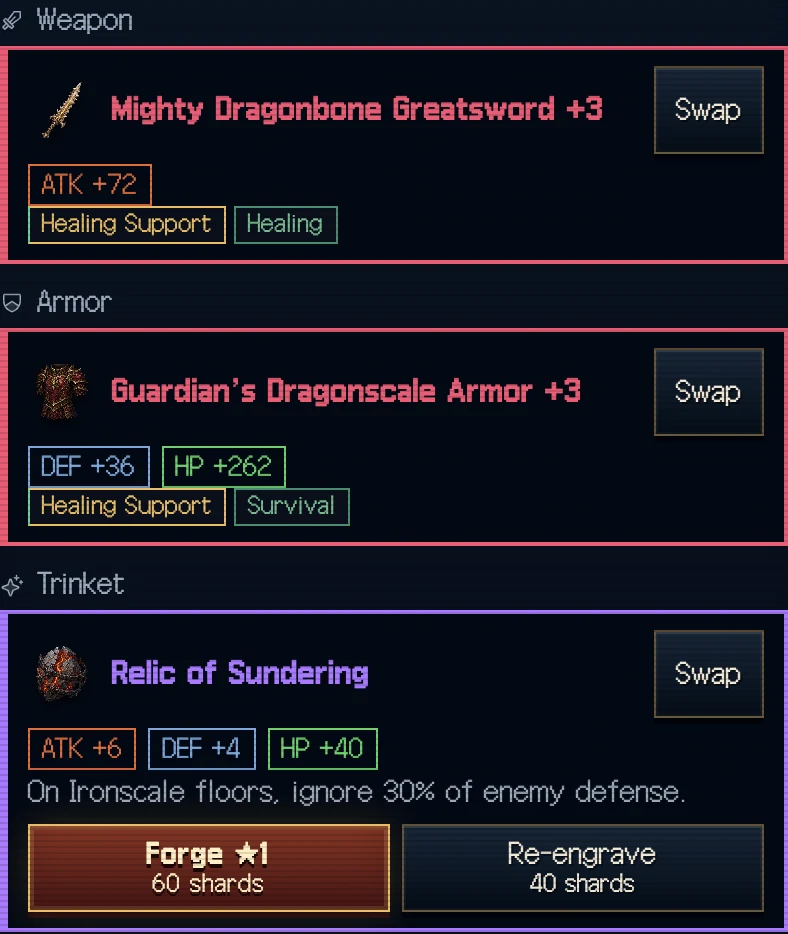
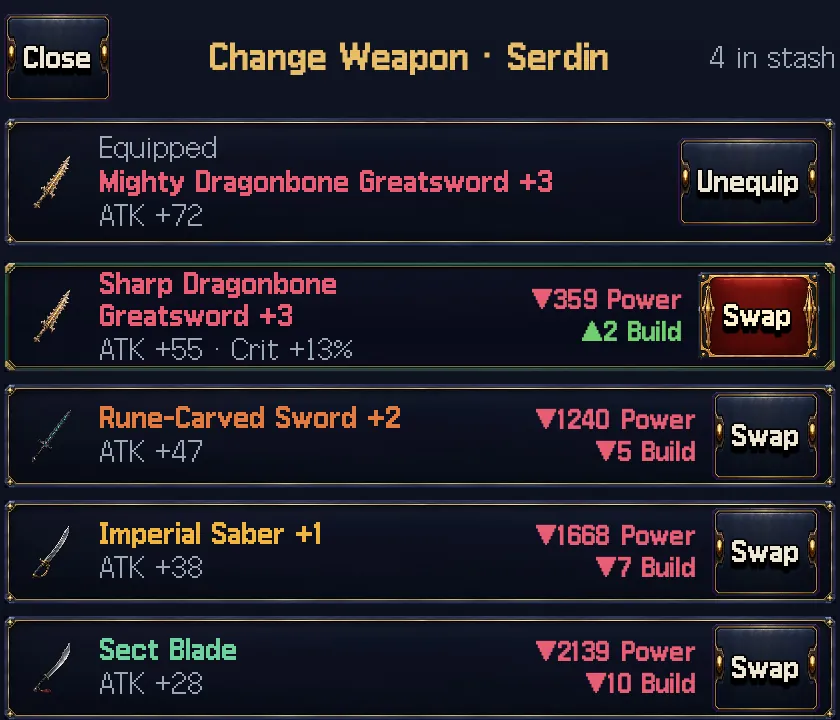
Tap "Swap" on a slot to see only the gear that fits it, best first, each row showing the power difference against what they wear now. Following that number alone never loses you anything, and "Auto-equip" on the mercenary sheet does the comparison for that one mercenary. It only takes gear from the Stash and only swaps when Power goes up. In tower prep, a ▲ appears on the portrait of anyone with an upgrade, and tapping the portrait changes just that person.
Tiers climb with the floors. The deeper the drop, the higher the tier. Weapons and armor go up to tier 6 in the first generation, and each new generation opens one more tier. Tier 7 belongs to relics, the trinkets that drop from floor 51.
Build. The rule forge suggestions and slot picks follow: Frontline Tank, Brawler, Crit Tempo, Spell Power or Healing Support. Each class starts with its own build. Change it on the Gear tab of the mercenary sheet and suggestions follow the new rule. Auto-equip picks by Power whatever the build.
Mastery. Spend gold on the Gear tab of the mercenary sheet to raise weapon and armor mastery. Battles don't raise it. Each level adds 1% to the attack, defense and HP of the gear in that slot, and the level stays with the slot when you swap gear. The cap is level 50. The first level costs 4,000 G and each level costs 20% more, which totals 746,730 G up to level 20 and 181,988,730 G up to the cap. A revival or a rebirth starts it over.
Moving gear. Under "Swap" on a slot, tap gear to try it on, then press Swap to keep it. Picking a member's gear from the list empties their slot and moves it to yours. You can't take gear from a member on an expedition or locked gear. The gear you had goes to the stash.
For one person, tap a portrait with ▲ in tower prep or press "Auto-equip" on the mercenary sheet. For a party, use "Gear Up This Party" in tower prep or "Gear Up All Parties" at the raid entrance. For the whole roster, use "Auto-equip everyone" under "Gear all" on the Mercenaries tab. All of them pick only from the stash, only when Power goes up, and never take gear another member wears. Locked and legendary gear stays put.
To hand a benched member's gear to your main team, use "Unequip non-party" under "Gear all" to return it to the stash, then auto-equip. It leaves your current lineup, last parties, reserves, saved lineups, hand-split raid parties and rear-duty members alone.
Mastery legacy. When a member retires, half the gold value of their weapon and armor mastery passes to one heir. Lower-level heirs gain more levels, and members on an expedition can't receive it.
Marks on this screen
Empty gear warning. An empty weapon or armor warning marks missing equipment. Open the mercenary’s Gear tab to fill the slot.
Diamond loot mark. A diamond on the result highlights loot. Check the item’s tier and options beside its name.
Gear tier colors. The name color and tier label identify an item’s tier. Weapon and armor art identifies the slot; relic art reflects the relic option.
NEW. NEW marks an item you acquired and have not inspected. Open its details to compare it with equipped gear.
Recommended and power delta. Recommended marks gear suited to the selected mercenary. The power delta compares the candidate item with the gear in that slot.
Gear effect chips. Chips such as damage or healing boosts summarize the effect of a gear choice. Compare the effect with the mercenary’s role.
Mastery levels. Mastery chips track experience with weapons or armor. Tap the info mark to read the bonus applied to the current gear.
Warehouse protection lock. A warehouse lock protects an item from automatic or bulk cleanup. Check protection before selling gear.
Warehouse selection marks. A gold frame and check in warehouse bulk selection mark items chosen for that action. Review them alongside protection locks.
Gear comparison arrows. An up arrow marks a stat increase in gear comparison; a down arrow marks a decrease. A plus/minus mark indicates no change.
Gear Codex highest floor. The gold highest-floor chip in the Gear Codex records the highest source floor for that tier. Read it as an item drop record.
Value tables: Tier values · Drop rates