 Tower & Mercenaries
Getting started
The week
A week is the guild’s cycle of assignments and pay. Finish an expedition or advance the week at base, and the mercenaries who stayed behind train or rest according to their assignments.
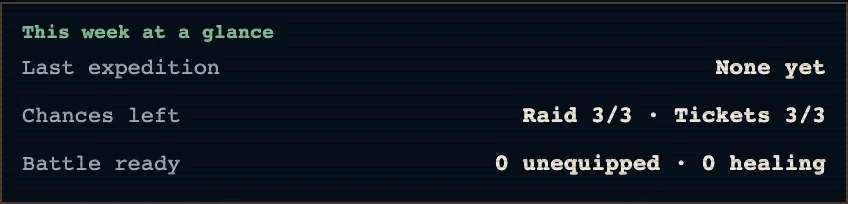
Prepare an expedition with "Climb" under "This Week’s Party" at the bottom of "Base". For a week at home, review assignments and press "Next Week", checking the wages shown on the button.
Spend a week on recovery if your main party has injuries or fatigue. Training adds fatigue, so assign rest to the people you need for the next expedition.
Marks on this screen
Mission icon. The mission icon marks a mercenary assigned to a rear mission. Check the details for the assignment and rewards.
Ambition flag. An ambition flag marks a mercenary relevant to the current ambition. Check the Ambition screen for the deployment goal.
Treatment and assignment badges. Assignment badges in the roster show each mercenary’s current work. Tap a treatment or mission badge to read its explanation.
Info and help marks. Tap a chip with an info mark to read the meaning of its value or badge. Help buttons beside headings open the related rules or glossary.
Lock. A lock icon or locked badge marks unavailable content. Read the entry’s unlock conditions or ownership status.
Owned and check marks. A check in the shop marks an owned product. Customization screens use a selection check for the chosen item.
Speaker and mute. A crossed-out speaker marks muted audio. In the Music Room, a playback mark identifies the current track.
Save warning dot. The dot in the save warning strip flags a save problem. Read the text beside it for the cause, such as a lack of storage space.
Login day chips. Gold marks today in the login streak. Past days use jade; remaining days use steel.
Prologue page dots. Dots beneath the new-game prologue mark the current page. The highlighted dot moves as you advance.
Customization frame and check. A check circle or gold frame in customization marks the item in use. The shape of the selection mark depends on the item type.
Nameplate selection and fading. Selected nameplate portraits carry a check and gold frame. Once the roster is full, unavailable choices fade.
Records icon. The records icon is the Records row in the Menu. Read the Chronicle and collected records.
Menu and notice bell. The Menu button opens Settings, Records and the Compendium. The bell opens game notices.
Value tables: Login streak · Apprentice course