 Tower & Mercenaries
Battle
Fatigue and injury
Mercenaries lose attack strength and speed as combat and training build fatigue. Injured mercenaries cannot deploy until they recover, and falling while exhausted can mean a longer recovery.
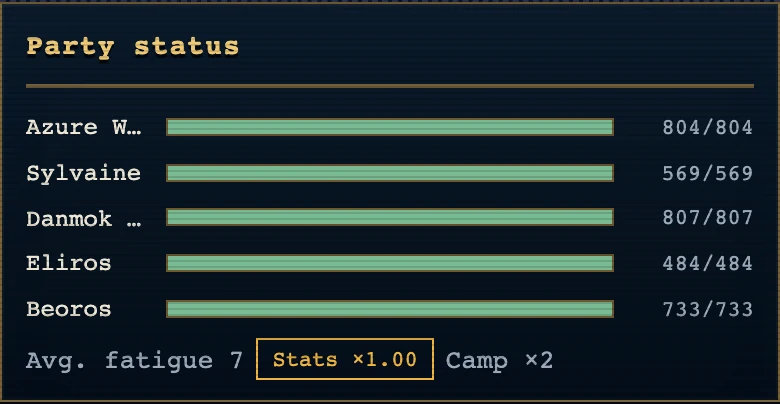
Open a mercenary under "Mercs" and check "Condition" in the "Growth" tab. Before departing, also check the party sheet in "Tower" and "Party status" on the scouting screen for exhausted mercenaries or those assigned to rest.
Assign rest and advance the week if your main party needs recovery before a boss. Upgrade Lodging to help with fatigue, and consider the Infirmary if injuries keep leaving gaps in your party.
When fatigue runs high
Once fatigue reaches these values, attack and action speed drop in battle. Hard and Expert lose more on regular climbs.
| Fatigue | Standard | Hard, Expert |
|---|---|---|
| 40 or more | −5% | −7% |
| 70 or more | −15% | −20% |
| 85 or more | −24% | −38% |
| 95 or more | −32% | −50% |
At fatigue 70 or more a mercenary is overworked. The fatigue number turns red, and falling in battle while overworked means a longer injury. Auto-assign puts overworked mercenaries on rest and the others on training. When "This Week’s Party" in "Base" includes overworked members, a rest button appears on that row. Tap it and they rest once they return from the expedition.
Marks on this screen
Status count. The icon beneath a formation card shows the highest-priority status. The number beside it counts all statuses in that group; hold the card to inspect the mercenary.
Injury icon. The injury icon marks a mercenary who needs treatment. A faded formation card marks an injured mercenary who cannot deploy; hold it to open the details.
Fatigue icon. The moon icon shows current fatigue. A red value marks exhaustion; fatigue reduces attack and speed in battle.
Morale hearts. The heart shows current morale. Low morale changes it to a broken heart and turns the value red.
Broken heart. A broken heart warns of low morale. Tap the info mark beside the value to read the morale explanation.
Roster filter counts. The count chips above the roster show how many mercenaries share a status. Tap a chip to filter the list.
Fatigue penalty percentage. A gold fatigue penalty chip shows the attack and speed lost to fatigue. The party summary averages the individual penalties.
Fatigue chip on a Base portrait. A fatigue chip appears on a Base portrait once fatigue causes a combat penalty. It uses gold below exhaustion and crimson at exhaustion.
Value tables: Fatigue · Morale, unpaid wages and leaving